Menu Bars


Tool Tips “?”
Click the “?” near the preset finder to enable tool tips. Hover over a control for a brief parameter description.
Info “i”
Open the Info panel for product information, third-party notices, license status, licensed identity when available, and manual license refresh.
Presets
A preset stores the state of all parameters. Aperture ships with a selection of professional build presets for you to choose from. You can also save your own presets to the plug-in.
Preset Locations
User presets are stored in the user’s application data folder under Panorama Audio Labs/Panoramic/Presets.
On macOS, this is expected to resolve under ~/Library/Application Support/.
Undo/Redo “<- / ->”
Undo and redo parameter-state changes.
Bypass
Bypass your plugin’s signal.
Side
Side monitors the side signal only. With internal Bypass off, it monitors the processed side path; with internal Bypass on, it monitors the delayed dry side path.
Elliptical
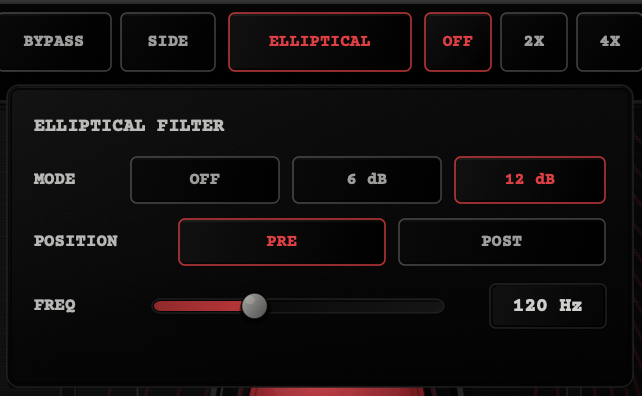
Mono the low frequencies with a 6dB/Oct or 12dB/Oct high-pass filter either before the parallel sum (Pre) or after the parallel sum (Post). This allows you to choose when and whether to remove low frequencies from the side signal to drive it into your parallel processing. By applying the elliptical filter in post, those low frequencies will be colored by the density and character modules. By applying the elliptical filter in Pre, they won’t.
Oversampling “Off, 2x, 4x”
Oversampling is selectable to avoid aliasing distortion. It’s particularly useful when using any amount of the Air module, or when driving the character hard.
UI Scaling “…”
UI Scaling adjusts the UI size to fit your screen and workflow: 75%, 90%, 100%, 110%, or 125%.
License
Click Activate or Start 14-day trial to activate your plug-in via a web-based setup. Sign out of your plug-in license to remove the license from the system you’re currently on.
Module Bypass
The red lamp in the top-right acts as a module bypass for each module.